Friday, 8 May 2015

Reflective Synopsis

This post I will delve into my discoveries of the inclusion of Information Communication Technologies (ICT) in the classroom, and why it has a very important place in today’s education system. From this discussion you will not only discover how ICT can further prepare students to be more active and successful in today’s society, but also how it can be a great tool for the educator to give and get real time data.

Picture 1
The Australian Professional Standards for Teachers, standard 2.6 states a graduate level teacher must implement ICT into teaching strategies to expand curriculum learning opportunities for students (AITSL, 2013). Therefore, if educators are to be compliant with the Australian Teaching Standards they must incorporate ICT into their lessons. The level teachers engage ICT into their classrooms, in regards to the SAMR model can have a varying effect on students. We have learnt that ICT should be used in the transformative level of modification and redefinition in the SAMR model to truly foster higher order thinking of the students. Merely just substituting a book for a word document, for example, can just as easily cause student disengagement. Substitution and augmentation is where the teacher is driving the students learning, but at the modification and redefinition levels the learning is more students driven – this is at a level where higher order learning occurs. 
       
The NMC Horizon report suggest that growing pressure is being put on teachers to understand how to use ICT tools and also to integrate them that foster more authentic digital learning (Horizon, 2014).
 Advancements of computers and the internet in the twenty-first century are changing the way education can be delivered. Education has moved from the teacher standing at the front of the classroom and delivering the learning material (teacher centred learning) to the current movement of student centred learning where the students interested is sparked by relevant community related questions. The students will then conduct their own research and the teacher role becomes more of a mentoring role, guiding the students while allowing them to have a more of a say in their own learning (Horizon, 2014). With student centred learning it may be expected that schools should be providing ways for students to continue to engage in learning activities, formal and informal, beyond the traditional school day (Horizon, 2014). From the previous examples and the fact that work is underway to develop deeper learning approaches (where ICT excels) it can easily be seen that teachers will need to be competent in ICT to allow students to follow the student centred learning path.

I have included the Digital technologies I enjoyed exploring in class into four categories of digital technology:
Picture 2
1.      Digital tools – Video
2.      Digital platforms – Weebly, Wikispaces
3.      Presentation tools – Bubbl.us, PowerPoint
4.      Learning support tools - Voki


Now that technologies are making their way into classrooms it is important for teachers and students to be aware of the legal and ethical ramifications of not adhering to the school and government policies. This can easily be done by bringing policies to everyone’s attention and by the teacher also making sure that they demonstrate these procedures while they are conducting all tasks.
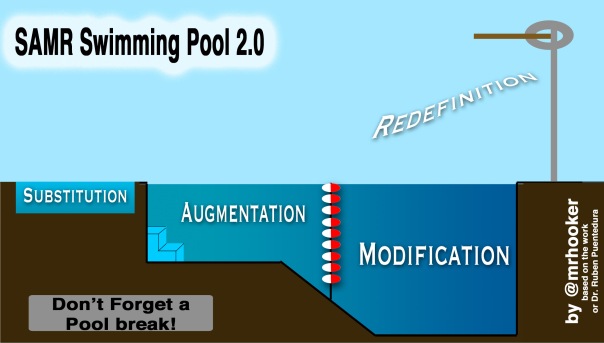
Picture 3

Throughout the last seven weeks I have hopefully discovered the meanings and the links between Digital Pedagogy, Bloom’s Taxonomy and the SAMR model. The SAMR model is a tool that can provide teachers with a way to select self-reflect and refine how they incorporate ICT into their practice and pedagogy. These three tools are critical if the teacher is trying to develop successful digital pedagogy. ICT has the biggest impact on learning outcomes in the more complex areas of Blooms Taxonomy of analysis, synthesis and evaluation. Therefore when developing a lesson the teacher needs to understand what level of learning outcomes their students are at in regards to Blooms Taxonomy, and aim for those levels while incorporating ICT’s based on the SAMR model preferably at the transformative level (modification or redefinition). This will insure the best possible learning outcomes for the students.

Digital pedagogy, Blooms Taxonomy and the SAMR model was hard for me to comprehend in the context of my teaching discipline of Industrial Technology and Design. I could not really visualise how I could incorporate ICT into my teaching area but I do believe I can incorporate it into my theory lessons in the future with more personal development and experience.   
Overall, I really enjoyed being exposed to new websites and learning the new skills that go along with operating them. This experience will be of great benefit to me as an educator and more importantly will help improve lesson engagement with my students in their learning material. I believe the best teachers have the option to incorporate all the tools available to them to achieve greater student academic results, therefore, if a teacher wants to continually improve as an educator they need to stay abreast of the latest technologies available to them.    

Works Cited

AITSL. (2013). Retrieved from http://www.aitsl.edu.au/australian-professional-standards-for-teachers/standards/list
AITSL. (2014). Retrieved from http://www.aitsl.edu.au/australian-professional-standards-for-teachers/search?&fc=CareerStage!graduate&fc=Scope!Iop&t=2&fc=Focus!3.1

Horizon, N. (2014). NMC Horizon Report. Retrieved from http://cdn.nmc.org/media/2014-nmc-horizon-report-k12-EN.pdf

Thursday, 30 April 2015

Reflection 6

From the very first lesson I attended for this subject, I became very excited and eager to learn what possibilities in ICT are available to improve student’s educational outcomes. Unfortunately it wasn’t long before I started to feel a little overwhelmed and had a feeling as if I was starting to fall behind in all my areas of my study, not just in this one.

When I reflect on this thought, I think a contributing factor was that I would have my tutorial late one afternoon than two days later I would have to submit the weekly assignment on the new technology I had just learnt in the previous lesson. Now I am not complaining about this because this is my journey and if I want to be successful in education then I must be competent in ICT. My school education finished twenty years ago (where I can’t really recall doing too much with computers) so I found myself concentrating more on the operation of these new technologies than the actual theory content of the lesson. I also struggled with the fact that I could not find too many examples of how I could use these new technologies in my teaching discipline of Industrial Technology and Design. As I worked through these difficulties I clearly understood the importance of ICT in schools and why a successful teacher must not only be able to operate new ICT technologies but also must understand and adapt to whatever technology may be available to them in the future.

Now I have that little rant out of the way I will discuss what I found really helpful through this course so far. Firstly, I am normally a quiet person in amongst people I am not familiar with, so I found the collaboration aspect of the class really helpful with breaking the ice with the other students. Secondly, I found that collaborating with the other students really took the stress and anxiety out of the development and planning stage of an assessment, as it cemented and further pin pointed the desired outcome. This would in turn give me a better chance of understanding and passing the assessment material. Other benefits from involving ICT in class include helping to better engage students in the lesson, and also equip students with the skills to work online.


Overall, I really enjoyed being exposed to new websites and learning the new skills that go along with operating them. This experience will be of great benefit to me as an educator and more importantly will help improve lesson engagement with my students in their learning material. I believe the best teachers have the option to incorporate all the tools available to them to achieve greater student academic results, therefore, if a teacher wants to continually improve as an educator they need to stay abreast of the latest technologies available to them. 

Thursday, 23 April 2015

Embedded Assessment Task 5


This week we looked at a range of diverse technologies that can be incorporated into a classroom. We were also asked to study the NMC Horizon Study Report which is a - comprehensive research venture established in 2002 that identifies and describes key trends, significant challenges, and emerging technologies likely to have a large impact over the coming five years in education around the globe.

I found it a little difficult to choose what programs I could use in my teaching area of ITD, but I decided that the following concepts I may be able to use in class:
·         Online concept mapping
·         Collaborative authoring
·         Mapping
I have chosen to explore the online concept mapping site of Bubbl.us, as at this stage, I believe I would use this program more often during class than the others presented.

            The conceptmap that I developed is based around different types of timber that can be used in our school workshop. Students would be asked to investigate what timber can be sourced locally/internationally, which timber is native to Australia and whether or not they are hard or softwoods? Students can further explore what timbers are readily available and what may be nearly extinct and whether or not any local timbers could be supplied/harvested by the school?
I believe these types of strategies would cover all of de Bono’s thinking hats and would also cover each of SAMAR’s criteria. This strategy would also fall into the Elements of creative classroom framework categories from NMC HorizonReport > 2014 K-12 Edition pictured below: 


Strategising this way would help each student meet the Australian Curriculum General Capabilities in ICT.

Thursday, 9 April 2015

Embedded Assessment Task 4

This week we looked at different types of media platforms that will help improve the presentation of learning materials to students. Platforms that we were asked to investigate included PowerPoint, Prezi, Glogster and Thinglink. Each of these programs have great features, but for me the main difference was that it only was PowerPoint that never had an ongoing fee and it also does not require an internet connection for the program to operate. It’s for those reasons I have chosen the PowerPoint to explore at a more in-depth level.

I have never previously used PowerPoint, other than reading off them in courses and quickly checking out some of their features. Needless to say it was not long before I had encountered problems with PowerPoint as well. The PowerPoint presentation on my computer looked and sounded nothing like the file I embedded onto platforms like “OneDrive” and “Authorstream”. These platforms did not have the same options for PowerPoint as my computer had, therefore when I embedded my file on these platforms it would completely change the format of my document and change the way it operates. Although I have only had roughly 1½ days experience on PowerPoint I was pleased with what I could construct on my computer but unable to replicate on my blog. There is obviously ways to do this well, as by the proof of what other students have done on their Blogs.

Upon discovering this information I would say that web based programs like Prezi, Glogster and ThinkLink would be easier to use when doing web based tasks. However PowerPoint may be easier to use when you don’t need an internet connection as you only require a memory stick and a computer?


Designing PowerPoints so they spark interest in your students is a key ingredient to getting your message across as this week’s reading of: Audience and Purpose suggests. The reading stated some basic facts about how you can strategise your message to better improve the delivery of the content you are trying to get across to your students. It was really the very first paragraph of this reading that resonated with me. I have included it below:


Designing PowerPoints to spark interest in your students is a key ingredient to getting your message across, as this week’s reading of Audience and Purpose suggests. The reading stated some basic facts about how you can strategise your message to better improve the delivery of the content you are trying to get across to your students. It was really the very first paragraph of this reading that resonated with me. I have included it below:
When you communicate, your purpose is not what you want to do; instead, it is what you want your audience to do as a result of reading what you wrote or listening to what you said. Thus, it involves the audience. To communicate effectively (that is, to achieve your purpose), you must adapt to your audience. Therefore, you must know your audience.
I tried to follow the above instructions in my attached PowerPoint on workshop safety. I used current movie figures to quickly spark interest and to reiterate that we all think we are superheroes, but we all still can get hurt. I believe this PowerPoint can be generated so that I could provide further web links which would provide further exploring options and tests for the students that would be individually driven and paced? I believe this strategy would then fall under the red (feelings) and blue (control) hats of de Bono and would also cover each of SAMAR’s criteria. Strategising this way would help each student meet the Australian Curriculum General Capabilities in ICT.


Thursday, 2 April 2015

Multimodal Education


Assessment Embedded Task 3:


According to Suzanne M. Miller and Mary B. McVee education needs to be embodied with the digital world if students are to feel that their education is meaningful and useful to their lives. Incorporating the digital world into the classroom is using technologies that improve the educational outcomes of students. These include images, audio files and videos. Below are some examples of how each of these types of media can enhance learning and meaning for the students:

Images:
·         Images can be used to spark interest in learning material
·         Engaged deeper thinking through evaluation and analysis e.g. See, Think Wonder tool
Audio:
·         Learn on the go
·         Instant updates
·         Keep knowledge in the one archive
·         Easy to recall information in the future
Video:
·         Help students retain what they learn
·         Help students better express their deepest understanding of core classroom content
·         Promotes creativity
·         Engages students in their learning

All of these types of media can be modified by the educator to help better facilitate the needs of individual classrooms. Students may also be allowed to individualise certain aspects of some media to help with their engagement.


Using the SAMAR model I can incorporate images into my teaching discipline of Industrial Technology Design as follows:

How to use and/or examination of Vernier Calipers


  Substitution –, an image could be included into paper instructions to help clarify and explain the correct measurement technique.
Augmentation – image and instructions to be completed online.
Modification – Students to self-record displaying competence in undertaking task at their own pace.
Redefinition –Recording to be uploaded by student and checked by teacher at their own pace.


Wednesday, 25 March 2015

Embedded Assessment Task 2: Websites


A website can be used as a strategic tool during a lesson to assist with the scaffolding of a subject an educator is teaching. My teaching area is Industrial Technology and Design (ITD) and I believe that a website would be of great benefit to my class during their theory lessons. Not only will it minimise students time with the dreaded text book, but it would also involve them in a more modern, exciting and productive way of learning.

Websites can be catered to a specific task, which would be like a one stop shop for that specified task. Students who need to find/recall information will not have to search anywhere other than the supplied website, this would allow students to move on at their own pace and remove the fear of failure stigma.

 Anything from videos, web links, music, documents, pictures and surveys can be attached to a web page to help students understand and develop their skills in a particular subject area. For example in my teaching area of ITD (using the SAMR model) I could substitute the text book for a specifically designed web page that displays the exact same information and pictures as the text book. For the augmentation process, I would also link supporting learning materials and online quizzes to the web page. During the modifying process for example (if the students were studying workshop safety) they would be able to explore safety documents and requirements for employees in the workplace. Redefinition process may include collaborating and establishing safety documents for the workshop.

By clicking this web link you will be directed to a web page that I developed, it demonstrates some of the basic tools that can be installed and used on a web page to enhance students learning.


Friday, 20 March 2015

Reflection 1: de Bono's Hats/Mobile Phones wikispaces activity


This whole first task has been a massive learning experience for me, as I have never used any of these web sites before. As Judy Willis states “you need to gain the students curiosity in what you want to teach” and this certainly was the case for me as I was quickly trying to think how I could incorporate Information Communication Technologies (ICT) into my teaching discipline of Industrial Technology and Design.

At first glance I was unsure of what was required of me in this activity where we had to critically analyse (using the de Bono’s Hats thinking routine) the use of mobile phones as a tool for students in class. One quick look at our class wiki page (where all our class share their thoughts and beliefs on this task) cemented in my mind what was required to complete this task. Being able to quickly access other student’s thoughts definitely removed the barrier of making a mistake for me. As Judy Willis suggests, if the fear of making a mistake is removed it will make for a safer classroom and therefore a better learning environment.

When first asked the question for this task I believed that a mobile phone should not be used in class, but after analysing the question using the scaffolding of de Bono’s beliefs I found that my opinion had completely changed and that I really needed more information to make more of an informed decision.  This type of scaffolding makes you investigate all perspectives of the argument so you can come to an informed decision.

Other positives from participating in a wiki like this are that it encourages discussion on the topic which in turn may cause individuals to adjust/correct their beliefs from interpreting the different responses in the post. While there are definite positives there are also some drawbacks for this type of wiki. These include; everybody needs to have a computer and internet connection, students can lose their work if typing directly onto the wiki page as opposed to copying and pasting their work from a saved Word document. Students may be restricted in the way of coming up with original ideas if they rely too heavily on reading other students work and there may be a chance of public ridicule if other people disagree with their post. 

I believe the learning process of this project has followed the six major categories of the cognitive process under Bloom's Cognitive Taxonomy. I gather Bloom's Taxonomy is the basis that all good pedagogy practices are built from.